This is a demo store. No orders will be fulfilled.


Kaspersky Standard - Plus - Premium - Comparison table with all functions
January 08, 2026
Views:
122
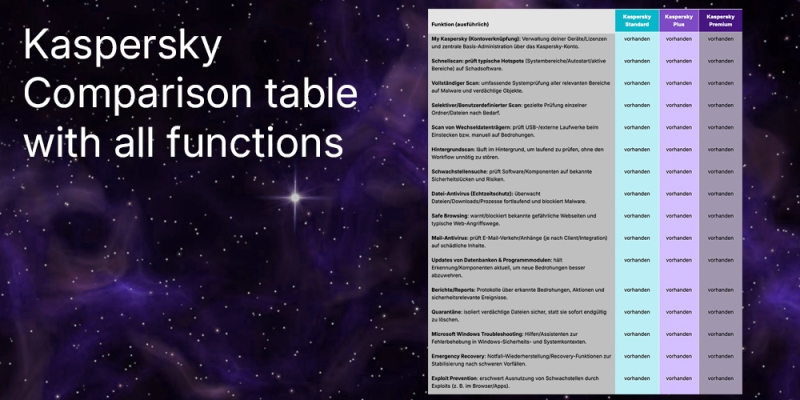

| Function (detailed) | Kaspersky Standard | Kaspersky Plus | Kaspersky Premium |
|---|---|---|---|
| My Kaspersky (account link): Management of your devices/licenses and central basic administration via the Kaspersky account. | available | available | available |
| Quick scan: checks typical hotspots (system areas/autostart/active areas) for malware. | available | available | available |
| Full scan: comprehensive system scan of all relevant areas for malware and suspicious objects. | available | available | available |
| Selective/user-defined scan: targeted scan of individual folders/files as required. | available | available | available |
| Scan of removable media: checks USB/external drives for threats when inserted or manually. | available | available | available |
| Background scan: runs in the background to check continuously without unnecessarily disrupting the workflow. | available | available | available |
| Vulnerability scan: checks software/components for known vulnerabilities and risks. | available | available | available |
| File antivirus (real-time protection): continuously monitors files/downloads/processes and blocks malware. | available | available | available |
| Safe Browsing: warns/blocks known dangerous websites and typical web attack paths. | available | available | available |
| Mail antivirus: checks e-mail traffic/attachments (depending on client/integration) for harmful content. | available | available | available |
| Updates of databases & program modules: keeps detection/components up to date to better ward off new threats. | available | available | available |
| Reports: logs of detected threats, actions and security-related events. | available | available | available |
| Quarantine: securely isolates suspicious files instead of deleting them immediately and permanently. | available | available | available |
| Microsoft Windows Troubleshooting: Help/wizards for troubleshooting in Windows security and system contexts. | available | available | available |
| Emergency Recovery: Emergency recovery/recovery functions for stabilization after serious incidents. | available | available | available |
| Exploit prevention: makes it more difficult to exploit vulnerabilities through exploits (e.g. in the browser/apps). | available | available | available |
| System Watcher: Behavioral analysis of processes; helps to detect/defend against ransomware behavior, among other things. | available | available | available |
| Weak Settings Scan: finds risky/unsecure system settings that could facilitate attacks. | available | available | available |
| Network Attack Blocker: blocks typical network attacks and suspicious network activities. | present | available | available |
| URL Advisor: displays security ratings/indicators for links/pages before you click. | available | available | available |
| Kaspersky Protection browser extension: integration into the browser for additional web protection functions. | available | available | available |
| Intrusion Prevention: additional layer of protection against intrusion attempts and suspicious system/network actions. | available | available | available |
| Firewall: controls incoming and outgoing connections and blocks unwanted network access. | available | available | available |
| Network Monitor: displays/monitors network activities to make conspicuous connections more visible. | available | available | available |
| Smart Home Monitor: monitors connected devices/smart home environment and makes risks/anomalies more visible. | - | available | available |
| Anti-phishing: recognizes and blocks phishing sites/attempts to steal passwords or payment data. | available | available | available |
| Quick Startup: reduces startup time/autostart brakes to be ready for work more quickly. | available | available | available |
| PC Speed-Up: System optimization to reduce "ballast" and improve performance. | available | available | available |
| Duplicates: finds duplicate files to save disk space and create order. | available | available | available |
| Large Files: identifies very large files as a starting point for quickly saving storage space. | available | available | available |
| Unused Apps: recognizes rarely used programs to facilitate cleanup/uninstallation. | available | available | available |
| App Updater: checks installed programs for updates and supports updating. | available | available | available |
| Current Activity: Overview of ongoing protection/system activities and relevant events in real time. | available | available | available |
| Game Mode: reduces disruptions/pop-ups and prioritizes performance when playing. | available | available | available |
| Do not Disturb Mode: suppresses notifications at certain times/activities. | present | available | available |
| Battery Saver: optimizes/limits activities to reduce energy consumption (where appropriate). | available | available | available |
| Hard Drive Health Monitor: monitors drive status/health indicators to detect failures at an early stage. | - | available | available |
| Backup and Restore: Backup/restore functions for backing up and restoring important data. | - | available | available |
| Data Leak Checker: checks for data leaks; in Standard only for a single account, in Plus/Premium as an extended version. | available | available | available |
| Private Browsing: reduces tracking/data collection when surfing and makes profiling more difficult. | available | available | available |
| Safe Money: hardened protection for payment/banking activities and online purchases. | available | available | available |
| Webcam & Mic Control: controls/manages app access to camera and microphone. | available | available | available |
| Stalkerware Detection: detects unwanted surveillance/spying apps and similar risks. | available | available | available |
| Unwanted App Installation Blocker: blocks/warns of potentially unwanted installations. | available | available | available |
| Adware Remover: detects/removes advertising software and similar annoying/risky components. | present | available | available |
| Anti-Banner: blocks annoying/risky advertising banners (depending on browser/component). | available | available | available |
| Privacy Cleaner: removes traces/temporary data (e.g. browser/system traces) to increase privacy. | available | available | available |
| Kaspersky VPN: encrypted connection for more privacy/security in networks (regional restrictions may apply). | - | available | available |
| Password Manager: secure storage/checking of passwords and convenient login handling. | - | available | available |
| File Shredder: secure deletion of sensitive files, difficult to recover. | - | available | available |
| Secret Vault: protected storage area for sensitive data (vault/data safe function). | - | available | available |
| Identity Protection Wallet: additional identity/document protection functions in the Premium plan. | - | - | available |
| Remote Access Detection: detection of suspicious remote access activities as an identity/security risk. | - | - | available |
| Identity Theft Check: additional check function for identity theft in the Premium plan. | - | - | available |
| Premium Support Services: Premium support services (e.g. prioritized help/services as per Premium plan). | - | - | available |
Disclaimer
This article is for general information purposes only and does not constitute a sales or licensing recommendation. All information has been compiled to the best of our knowledge, but is provided without guarantee of completeness or accuracy. License conditions are subject to change and may be interpreted differently in individual cases. The content does not replace individual legal or licensing advice.
January 08, 2026

Related Products
Kaspersky Standard
From
15,60 €

Kaspersky Standard Renewal
From
14,30 €
Kaspersky Plus
From
19,95 €
Kaspersky Plus Renewal
From
0,29 €

Kaspersky Premium
From
32,95 €
Kaspersky Premium Renewal
From
0,25 €
Popular Posts

Back to Top






